
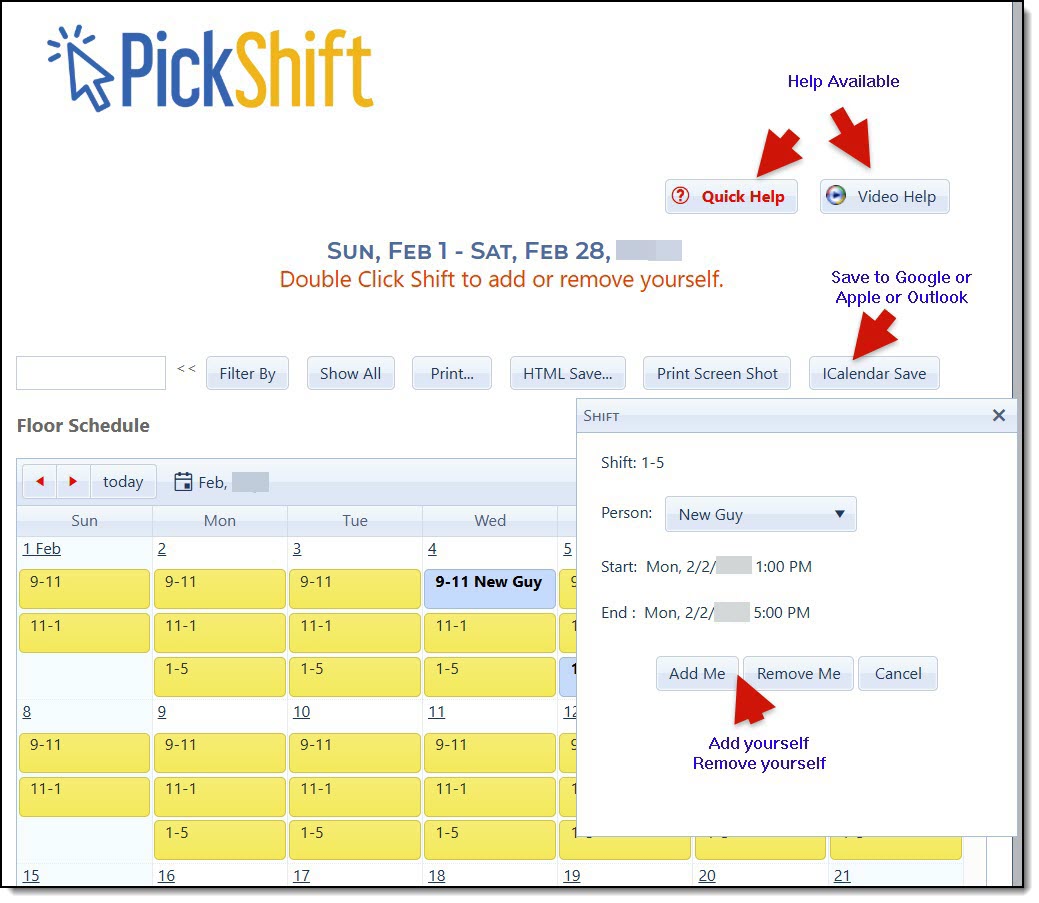
Agents can select available shifts or manage shifts already assigned to them directly from the Floor Schedule calendar.
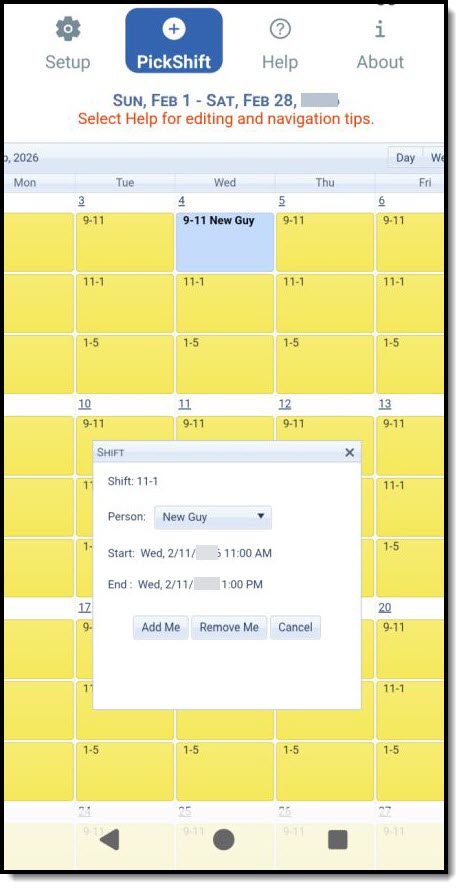
Agents and schedulers can access PickShift from the phone app, making it easy to manage schedules while away from the office.
PickShift is an optional self-scheduling feature included with Floor Schedule, real estate floor duty scheduling software designed specifically for real estate offices. PickShift gives agents the ability to select and manage available floor duty shifts themselves, while the office scheduler remains in control of the schedule and the rules that apply.
Instead of the scheduler having to assign every floor duty shift, PickShift can allow agents to add themselves to available shifts. Agents can also remove themselves from eligible shifts and use PickShift to help manage shift changes or swaps. This can reduce the time the scheduler spends handling routine schedule changes while giving agents more flexibility in choosing when they work.
PickShift gives the scheduler control over how agents select their own shifts. The scheduler establishes office-wide rules that PickShift automatically applies to all agents and can change those rules whenever needed. Limits can be set for the maximum number of shifts an agent may select in a day, week or month; morning and afternoon shifts; weekend shifts; and individual days of the week. This allows agents the freedom to choose their own floor duty while the scheduler maintains control over how the schedule is filled.
PickShift can be used with a blank schedule, allowing agents to build the schedule by selecting available shifts, or it can be used after Floor Schedule automatically generates the schedule. This gives each office the flexibility to decide how much of the scheduling process should be automated and how much should be left to the agents.
PickShift is optional and can be turned on or off by the scheduler. Offices can establish scheduling limits and rules while still allowing agents to choose from the shifts that are available to them.
Schedulers can also use PickShift to edit the schedule themselves. An agent is restricted to selecting empty shifts or managing shifts to which that agent has been assigned. A scheduler, however, can sign in to PickShift using the same scheduler login credentials used at myFloorSchedule.com and edit any shift on the schedule, including adding or removing any agent. This gives the scheduler full control of the schedule while still providing agents with convenient self-scheduling options.
PickShift can be accessed directly at www.PickShift.com. Agents sign in to select and manage the shifts available to them. Schedulers use the same scheduler login credentials they use at myFloorSchedule.com and can edit any shift, add agents to shifts, or remove agents as needed.
PickShift is available to both agents and schedulers through the Floor Schedule phone app, making it easy to manage floor duty schedules on the go. Agents can use the app to work with the shifts available to them, while schedulers can use their scheduler credentials to make changes anywhere they have access to their phone.
PickShift is designed for the way real estate offices handle floor duty, opportunity time, up time and other agent shift assignments. It works as part of Floor Schedule, so offices can combine automatic scheduling, agent requests and agent self-scheduling in the way that works best for their brokerage.
Nothing to download or install. PickShift is cloud-based and included as an optional feature of Floor Schedule.
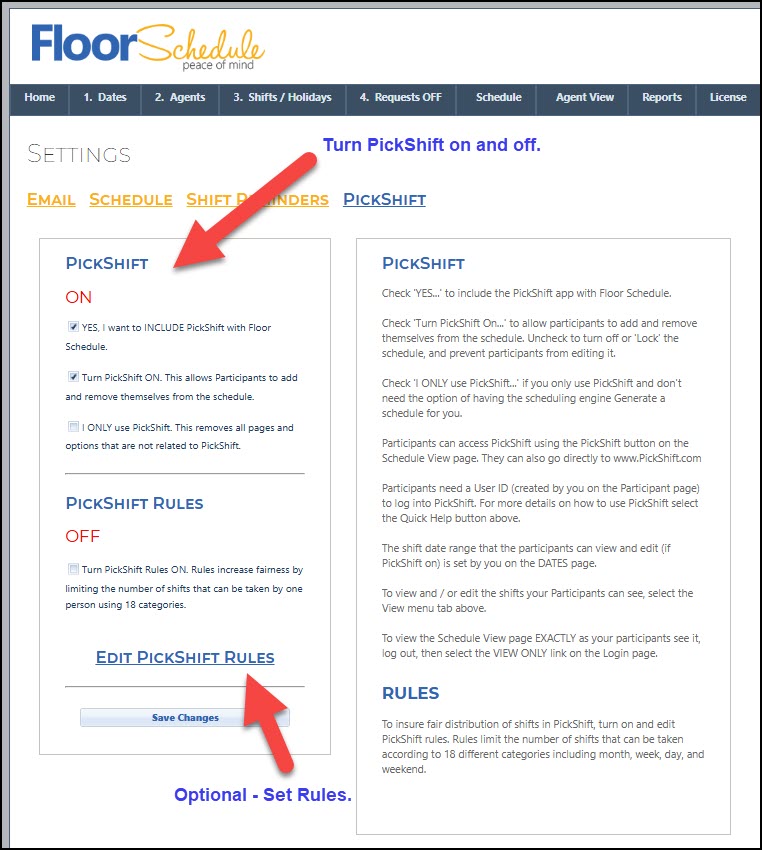
The scheduler controls whether PickShift and agent self-scheduling are active and can enable optional scheduling rules.
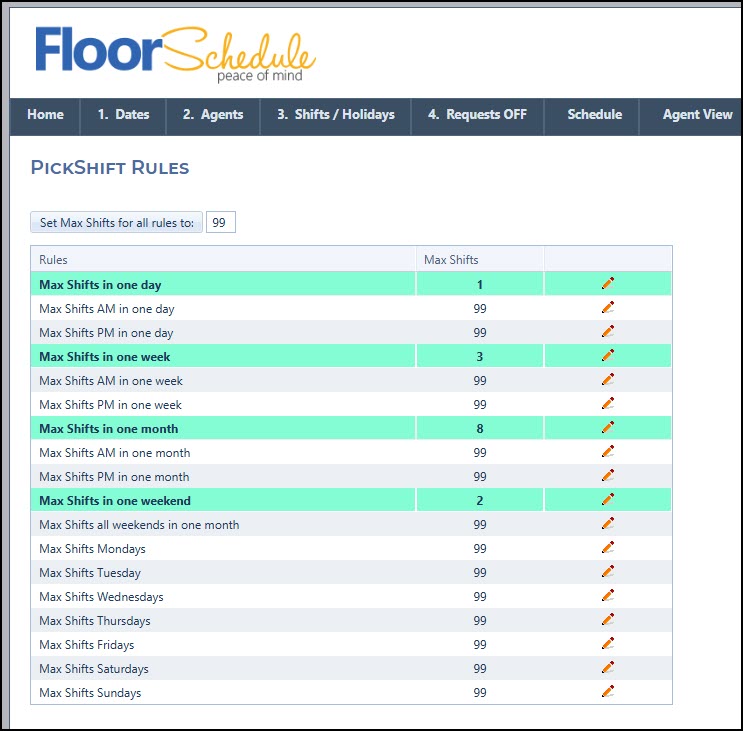
Schedulers can establish office-wide limits for day, week, month, AM/PM, weekends and individual weekdays. The values shown are examples and can be changed by the scheduler.
PickShift is the optional agent self-scheduling feature included with Floor Schedule. It allows real estate agents to select available floor duty shifts and manage eligible shifts themselves, while the office scheduler remains in control of the schedule.
Yes. When PickShift is enabled, agents can select available empty shifts that the office makes available to them.
Yes. Agents can manage shifts to which they have been assigned, subject to the scheduling rules established by the office.
Yes. Schedulers can sign in to PickShift using the same scheduler credentials used at myFloorSchedule.com. Unlike agents, schedulers can edit any shift and can add or remove any agent.
Yes. PickShift works with either a blank schedule or a schedule already created by the Floor Schedule scheduling engine.
Yes. The scheduler can establish office-wide PickShift rules controlling the maximum number of shifts agents can select by day, week or month, including separate limits for morning, afternoon, weekend and individual days of the week. These rules can be changed by the scheduler as needed.
Yes. PickShift is available to both agents and schedulers through the Floor Schedule phone app, making it easy to review and edit schedules while away from the office.
Yes. PickShift is included as an optional feature of Floor Schedule and can be turned on or off by the scheduler.
 1. Set Up